
.png)
Description
Download Lyric Changer – Personalize Any Song, AI‑Powered Lyrics Editor
Overview
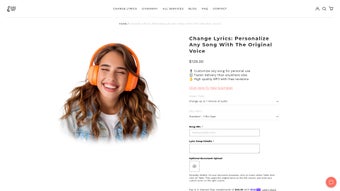
Lyric Changer Personalize Any Song is a web‑based AI music tool that lets you rewrite the lyrics of virtually any track while keeping the original artist’s vocal performance intact. Unlike traditional karaoke apps that only mute the vocals, this service employs advanced voice‑synthesis and audio‑matching algorithms to seamlessly blend your custom words into the existing recording. The result is a fully‑produced MP3 that sounds as if the original singer is delivering your message. Whether you want a heartfelt birthday tribute, a quirky wedding toast, or a meme‑ready remix, Lyric Changer delivers a cost‑effective, professional‑grade solution without requiring you to have any music‑production experience. The workflow is simple: place an order, send your new lyrics by email, and within a few days the engineered track arrives in your inbox. Free revisions are included to guarantee that the final version meets your expectations. The platform is designed for music lovers, event planners, and creative hobbyists who crave a personalized soundtrack but do not need a full‑blown studio session. While the service is not intended for commercial redistribution, it excels at creating one‑off, private‑use recordings that feel genuinely custom‑made. Because the entire process is handled by a team of audio engineers and AI specialists, you get a polished product without the hassle of learning complex software or buying expensive plugins.
Key Features
- AI‑Driven Vocal Replication: Uses deep‑learning models to mimic the original singer’s timbre, pitch, and phrasing, ensuring the new lyrics sound authentic.
- Full‑Song Preservation: Keeps the original instrumental, background vocals, and production elements untouched, so the vibe of the track remains unchanged.
- Easy Text Submission: Submit your custom lyrics via a simple email form; no need for complex file uploads or special formatting.
- Free Revisions: Includes up to two complimentary revision rounds, allowing you to fine‑tune wording, timing, or emphasis.
- High‑Quality MP3 Delivery: Receive a 320 kbps MP3 file that is ready for playback on any device—Windows, Mac, Android, or iOS.
- Fast Turnaround: Most orders are completed within 48‑72 hours, with an expedited 24‑hour option available for urgent requests.
- Secure Payment & Data Handling: All transactions are processed through encrypted gateways, and personal data is stored in compliance with GDPR standards.
- Non‑Commercial Use License: The delivered track is licensed for private enjoyment, gifts, or event playback only, protecting both the artist’s rights and your peace of mind.
How to Order, Install & Use the Final Track
Even though Lyric Changer is a cloud‑based service and does not require you to install software locally, understanding the end‑to‑end process helps you get the best results. Follow these steps for a smooth experience:
- Select Your Song: Browse the catalog on the Lyric Changer website or provide a direct link to the track you want to modify. The service supports most mainstream releases and many indie recordings.
- Place Your Order: Choose a package (Standard = 3‑day delivery, Express = 24‑hour delivery) and complete the checkout. You’ll be asked for basic contact details and a brief description of the intended use.
- Submit Your Lyrics: After payment, you’ll receive an automated email with a secure link to upload your new lyrics. Include any timing cues (e.g., “line 2 should start on beat 4”) to help the engineers align the text perfectly.
- Review & Revise: Within the promised turnaround time, you’ll get a draft MP3. Listen carefully on your preferred device (desktop, phone, or tablet) and use the feedback form to request tweaks. The first two revisions are free of charge.
- Download the Final File: Once you approve the final version, a download link appears in your account dashboard. The MP3 can be saved to any folder, added to playlists, or transferred to portable speakers for event playback.
- Playback & Sharing: Because the output is a standard MP3, it works on Windows Media Player, macOS Music, Android’s Google Play Music, iOS’s Apple Music, and virtually any modern media player. Feel free to share the file privately via email, cloud storage, or USB drive.
While the service itself is web‑based, you may want a dedicated folder on your computer for “Lyric‑Changer Projects” to keep original lyrics, drafts, and final MP3s organized. This small habit makes it easier to manage multiple personalized tracks for larger events like weddings or corporate parties.
Pros & Cons
Pros
- Professional‑grade vocal replication without needing a recording studio.
- Simple email‑based lyric submission—no technical learning curve.
- Free revision cycles ensure satisfaction.
- Fast turnaround with optional express service.
- Secure payment processing and GDPR‑compliant data handling.
- High‑quality MP3 suitable for any playback device.
Cons
- Not a self‑service platform; you rely on the provider’s turnaround time.
- Limited to private, non‑commercial use; cannot be sold or streamed publicly.
- Pricing may be higher than DIY karaoke apps for users who only need basic lyric changes.
- Complex lyrical changes (e.g., multiple verses, rap sections) may require additional revisions.
- No mobile app; all interactions happen through a web portal and email.
Frequently Asked Questions
Can I change the entire song lyrics or just a single verse?
You can submit a full‑song rewrite or modify just a single verse or chorus. The engineers will align your new text to the original vocal timing, so both small tweaks and complete overhauls are possible.
Is the service legal for personal use?
Yes. Lyric Changer provides a non‑commercial license that permits private enjoyment, gifting, or event playback. The service does not grant rights for public distribution, streaming, or sale.
How long does it take to receive the final MP3?
Standard orders are delivered within 48‑72 hours. If you need it faster, the express option guarantees a 24‑hour turnaround (subject to availability).
What formats are supported for the final audio?
The final product is delivered as a 320 kbps MP3, which works on Windows, macOS, Android, iOS, and any device that supports standard audio playback.
Can I request additional revisions after the free ones?
Yes, you can purchase extra revision packages at a modest fee. This is useful if you need extensive lyrical adjustments after the initial two free revisions.
Conclusion & Call to Action
Lyric Changer Personalize Any Song stands out as a niche yet powerful tool for anyone who wants to turn a favorite track into a bespoke musical message. By marrying AI‑driven vocal synthesis with human quality control, it delivers a polished MP3 that feels like the original artist is singing your words. While the lack of a self‑service dashboard and the non‑commercial licensing limits may not suit every user, the service’s speed, free revisions, and high‑quality output make it a compelling choice for personal celebrations, surprise gifts, and creative experiments.
If you’re ready to surprise a loved one with a custom‑written anthem or add a unique twist to your next event playlist, download Lyric Changer now and start the ordering process. The intuitive web portal, secure payment system, and friendly support team ensure a hassle‑free experience from start to finish. Transform ordinary songs into unforgettable memories—one lyric at a time.
Get Started with Lyric Changer TodayGuides & Tutorials for Lyric Changer Personalize Any Song
How to install Lyric Changer Personalize Any Song
- Click the Preview / Download button above.
- Once redirected, accept the terms and click Install.
- Wait for the Lyric Changer Personalize Any Song download to finish on your device.
How to use Lyric Changer Personalize Any Song
This software is primarily used for its core features described above. Open the app after installation to explore its capabilities.
User Reviews for Lyric Changer Personalize Any Song 0
No reviews found




